Sales Data Analysis Project Using Power BI – Armaan Chauhan
Armaan Chauhan successfully completed a Sales Data Analysis project using Microsoft Power BI, demonstrating practical skills in data analysis, data transformation, business intelligence, data visualization, dashboard development, KPI reporting, and data-driven decision-making.
The project focused on analyzing sales data and transforming raw business information into meaningful and interactive insights. Microsoft Power BI was used to prepare data, create relationships, develop calculated measures using DAX, and build an interactive dashboard for analyzing sales performance, revenue, products, regions, trends, and key business metrics.
Project Overview
The objective of the Sales Data Analysis project was to understand business and sales performance through structured data analysis and interactive visualization. Armaan worked with sales data and followed a practical data analytics workflow, beginning with data preparation and transformation and progressing toward data modeling, visualization, dashboard development, and business insights.
The project demonstrates how Microsoft Power BI can be used to convert raw business data into interactive reports that make complex information easier to understand. Through Power BI dashboards, users can analyze important metrics, identify sales trends, compare performance, and explore business information from different perspectives.
Data Preparation and Transformation Using Power Query
Data preparation was an important part of the project. Armaan used Power BI and Power Query to prepare the available sales data for analysis and reporting.
The data preparation process involved activities such as reviewing datasets, cleaning data, transforming columns, handling data formats, removing unnecessary information, and preparing structured data for analysis.
Power Query provides an efficient way to transform raw data before it is used within Power BI reports. This helps ensure that the information used for visualization and analysis is properly structured and suitable for business reporting.
Power BI Data Modeling
After preparing the data, Armaan worked with Power BI data modeling concepts to organize the dataset and create a foundation for analysis.
Data modeling is an important component of Power BI because it allows different tables and datasets to work together within a report. Proper relationships and data structures help users create accurate calculations and meaningful visualizations.
Through this project, Armaan gained practical exposure to concepts related to tables, relationships, data fields, measures, calculated values, and structured Power BI reporting.
DAX and Business Calculations
The project also provided practical exposure to DAX, or Data Analysis Expressions, which is widely used in Microsoft Power BI for creating calculations and measures.
DAX can be used to calculate important business metrics such as total sales, revenue, profit, averages, percentages, comparisons, and other analytical measures. These calculations help transform raw data into meaningful business information.
By working with Power BI calculations and measures, Armaan demonstrated an understanding of how analytical formulas can be used to support interactive business reporting.
Power BI Dashboard Development
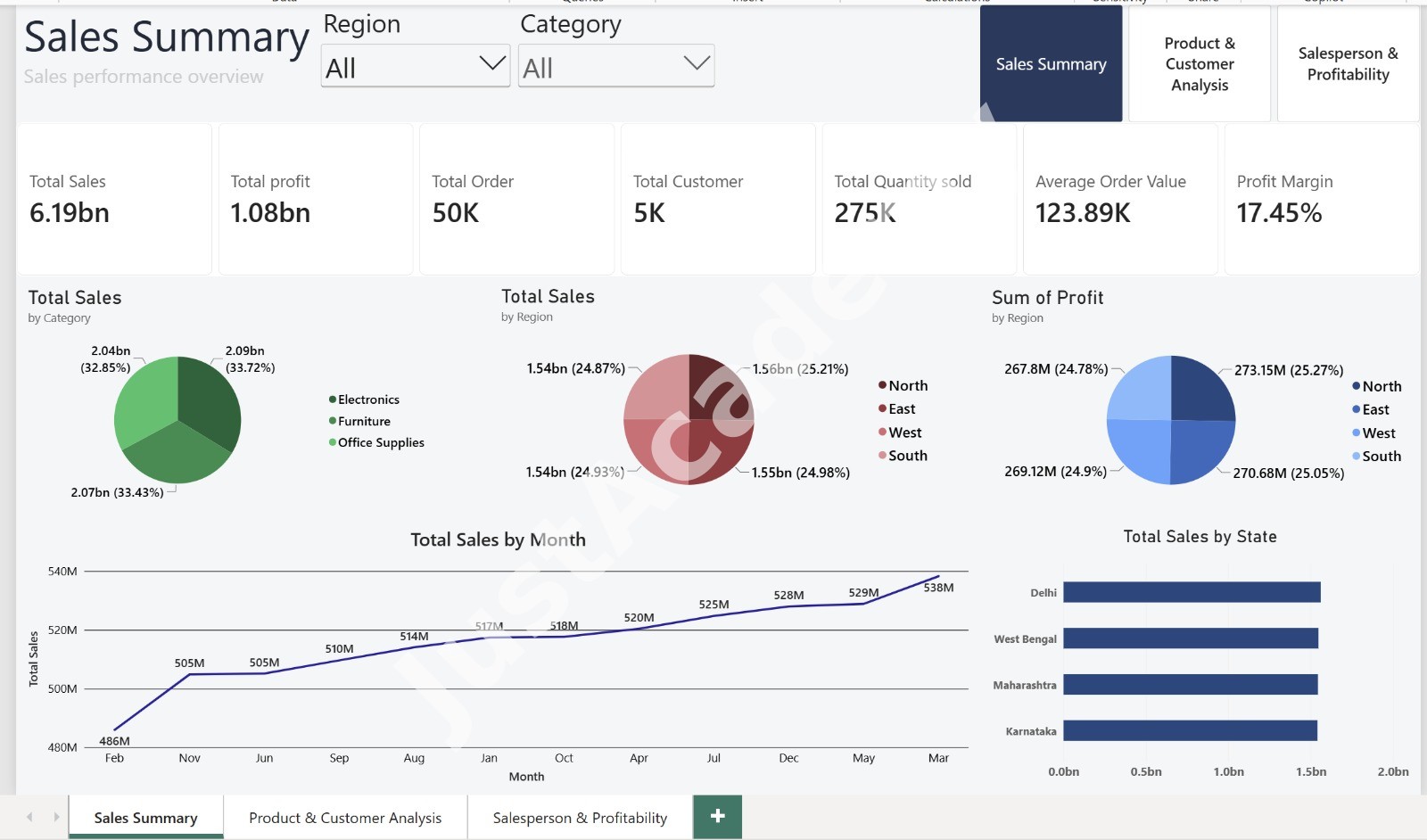
After preparing and modeling the sales data, Armaan developed an interactive Power BI dashboard to present the results in a clear and visual format.
The dashboard included visual elements such as charts, graphs, KPI cards, tables, slicers, and interactive filters. These visualizations helped transform large amounts of sales information into an easy-to-understand business report.
Interactive Power BI dashboards allow users to explore information dynamically, apply filters, compare different categories, and analyze business performance based on different parameters.
Sales Performance Analysis
A key objective of the project was to analyze sales performance and identify meaningful patterns within the available data.
The dashboard helped present important sales metrics and business information in a structured format. Such analysis can help businesses understand sales trends, compare performance across different categories or regions, identify high-performing products, monitor revenue-related metrics, and support business planning.
Instead of relying only on static spreadsheets or manually prepared reports, Power BI provides an interactive environment where users can explore sales information and generate insights more efficiently.
Key Skills Demonstrated
Through this project, Armaan demonstrated practical knowledge of:
- Microsoft Power BI
- Power Query
- Data Cleaning and Preparation
- Data Transformation
- Power BI Data Modeling
- DAX Calculations
- Data Visualization
- Interactive Dashboard Development
- Sales Data Analysis
- KPI Reporting
- Business Intelligence
- Business Reporting
- Data-Driven Decision Making
- Analytical Thinking
These skills are relevant for students and professionals looking to build careers in Data Analytics, Business Intelligence, Power BI, Reporting, and Data Visualization.
Power BI Training and Learning Opportunities
Students who want to develop similar practical skills can explore Microsoft Power BI Training in Mumbai and learn concepts related to Power BI dashboards, Power Query, DAX, data visualization, business intelligence, reporting, and analytics.
Learners based in Maharashtra can also explore Microsoft Power BI Training in Pune to develop practical knowledge of Power BI, data analytics, dashboard development, and business reporting.
For students and working professionals in the national capital, Microsoft Power BI Training in Delhi provides an opportunity to build practical skills in Power BI, data visualization, reporting, and business intelligence.
Learners in Telangana can explore Microsoft Power BI Training in Hyderabad to strengthen their knowledge of Power BI dashboards, data analysis, DAX, reporting, and business intelligence.
Similarly, students and professionals in Karnataka can explore Microsoft Power BI Training in Bangalore to develop practical skills in Power BI, data visualization, data modeling, business intelligence, and analytics.
Learning Outcome
Completing this project provided Armaan with practical exposure to the Power BI data analytics workflow. Instead of learning Power BI only through theoretical examples, he applied Power BI concepts to a structured sales analysis project.
The project demonstrated how raw business data can be prepared and transformed using Power Query, organized through data modeling, analyzed using DAX calculations, and presented through interactive Power BI dashboards.
This workflow provides practical exposure to the way data analysts and business intelligence professionals can use Power BI to convert business data into meaningful visual insights.
Conclusion
Armaan Chauhan's Sales Data Analysis project successfully demonstrated the practical application of Microsoft Power BI for business intelligence, data visualization, and sales analysis. The project covered important areas including data preparation, Power Query, data modeling, DAX calculations, KPI reporting, interactive dashboards, and business analysis.
The project highlights the importance of hands-on Power BI projects, data visualization, business intelligence, DAX, Power Query, and dashboard development. By completing this project, Armaan gained practical experience in transforming raw sales data into meaningful visual reports and business insights.
This project is an example of how project-based learning can help learners develop practical, industry-relevant Power BI skills and understand how modern organizations use data analytics and business intelligence to analyze performance and support informed business decisions.